From reactive to proactive maintenance

Maintenance teams spend most of the day chasing information. They don't have what they need in one place, so they search through SAP, emails, spreadsheets, conversations and long texts before they can even make a decision. Becoming proactive isn't another dashboard — it's the gradual return of control over the maintenance process.

Everyone solves today's problems instead of preventing tomorrow's

Because everyone is busy, workorders don't always get closed correctly. PM plans slowly become outdated because the estimated hours no longer match reality. Priorities become less reliable. People stop trusting the ERP system and start keeping information outside it — which makes the data even worse.

At the same time, there is almost no real feedback loop. Execution happens, but very little of what is learned actually makes its way back into planning, scheduling or engineering. The same mistakes happen again and again because nobody has the time to structurally solve them.

  • Priority 3 and 4 workorders get postponed until they escalate into Priority 1 and 2
  • Estimated labor hours and costs are rarely validated against actuals
  • Plan attainment stays low, so future costs become hard to forecast
  • Planning, scheduling and execution drift apart, each working from a different reality
The root cause

Reactive maintenance keeps feeding itself

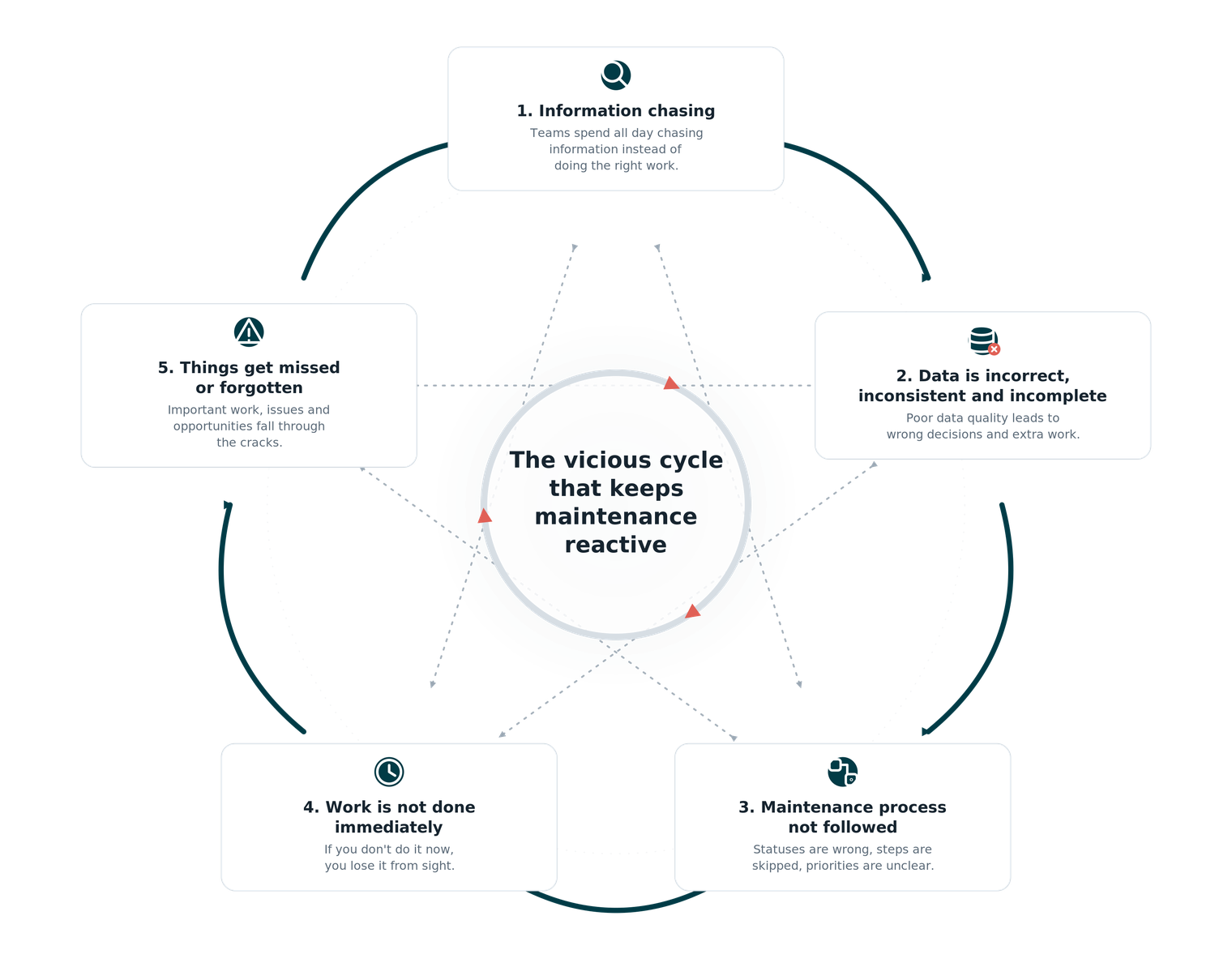
A handful of root causes both feed and are fed by the others. Teams chase information because the data can't be trusted. The data can't be trusted because the process isn't followed. The process isn't followed because everyone is too busy reacting. Each cause quietly recreates the next.

As long as the loop stays intact, individual improvements rarely last — the remaining root causes eventually recreate the same problems. That is why fixing one phase in isolation never holds.

The vicious cycle that keeps maintenance reactive: information chasing leads to incorrect, inconsistent and incomplete data; the maintenance process is not followed; work is not done immediately; and things get missed or forgotten — each cause reinforcing the next.

The same loop can run the other way

Every improvement is deliberately balanced across the maintenance process, so progress in one area is supported by progress in the others. Instead of one improvement being offset by the remaining root causes, each improvement starts reinforcing the next — and the loop gradually reverses.

Over time it runs in the opposite direction. Instead of creating reactive maintenance, it starts creating proactive maintenance, while continuously reducing unnecessary work for the team.

We don't assume the data is perfect. We assume the opposite.

Companies don't become proactive by implementing another dashboard or another planning tool. They become proactive by gradually restoring control over their maintenance process. That is why every GUSTY module is designed around the reality we see at almost every site.

We don't assume the data is clean. We don't assume the maintenance process is always followed. We don't assume everyone has time to keep the system properly maintained. We assume the opposite — because that is the reality. Poor data quality, inconsistent processes and incomplete ERP data are expected, not exceptions.

Breaking the cycle, one step at a time

Four steps, in sequence. Each closes a specific operational gap, and each one makes the next possible. Every module delivers value on its own — together they form a complete closed-loop maintenance system.

  1. 01 Restore the foundation
  2. 02 Learn from execution
  3. 03 Schedule with operational context
  4. 04 Close the feedback loop

Restore the foundation

You cannot plan proactively on data you don't trust. The first step is restoring the foundation. AI identifies workorders ready for closure and PM planning data that no longer reflects reality — the team confirms with one click, so nothing closes blind.

  • 30% average backlog pollution identified
  • Removes ghost hours from PM plans
  • Maximum one hour of input per person
  • Includes a complete analysis

Learn from execution

Execution is where planning succeeds or fails — and where almost nothing is normally learned. This step turns execution into feedback: the lessons learned are used to set up the Copilot and prevent the same execution issues from recurring.

  • 20 minutes per planner per week
  • Prevents new backlog pollution
  • Detailed First Time Right insights
  • Execution trends over time

Schedule with operational context

With thousands of workorders in the backlog, priority and due date are no longer enough to decide what to schedule. The scheduling tool determines the true operational priority of every workorder and tells the scheduler when it can actually be scheduled — with the full context behind it.

  • True operational priority
  • Complete workorder context and history
  • Personalized scheduling views
  • Daily workflow control

Close the feedback loop

Finally, the loop closes. The Copilot surfaces issues while there is still time to prevent them — or stops the same issue from happening again — so today's work automatically improves tomorrow's maintenance.

  • 98% fewer ERP clicks
  • One-click actions
  • Fully traceable and measurable
  • A continuous improvement system

The goal

The goal isn't better dashboards or better KPIs.

It's that maintenance teams regain control, stop firefighting, and have the confidence to plan proactively instead of constantly reacting. Better data and better numbers are a by-product of that control — not the other way around.

A typical implementation timeline

Each module delivers value on its own and can be implemented independently. In a typical Maintenance Operations rollout, the modules layer in over about ten weeks — from the KPI dashboard in week one to the Copilots by go-live — followed by a review and optimisation pass a few months later.

  1. KPI dashboard Week 0–1 · 1 week
  2. Backlog cleanup Week 0–2 · 2 weeks
  3. PM Estimate Validation Week 0–3 · 3 weeks
  4. Execution review Week 0–6 · 6 weeks
  5. Maintenance Scheduling Week 2–8 · 6 weeks
  6. Copilots Week 2–10 · 8 weeks

Three months after go-live: review, adjust & optimise.

See the full approach

The presentation walks through the problem, the root-cause loop, the four steps, a typical implementation timeline and the modules included.